What Is Wayland?
Wayland is the name of a display protocol. Traditionally, the X Window System was the mainstream choice. However, in recent years, Wayland has been developed more actively than X. The biggest differences from X are improved security and improved performance.
Architecture
Traditional X had the following architecture.
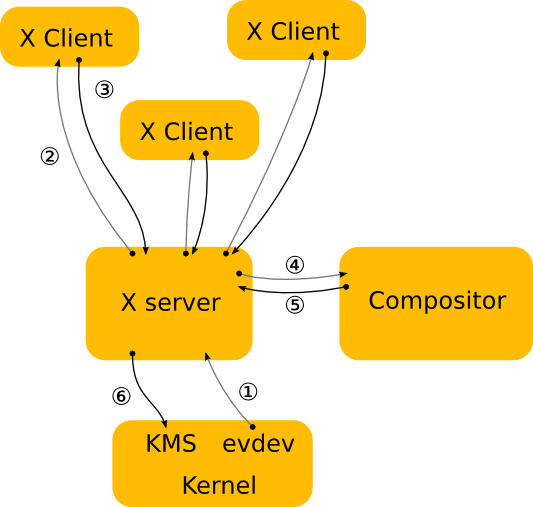
The X server communicates with clients and acts as an intermediary between them and the compositor. Here, “compositor” refers to a program that manages windows and related behavior, such as Mutter in GNOME or KWin in KDE Plasma.
The architecture of the X Window System has the following issues:
- Its security model is outdated
- The X server mediates most operations, which reduces performance
- The compositor was added later
- It does not support fractional scaling such as 1.5x or 1.75x
- The protocol is huge and difficult to implement
In contrast, Wayland adopts the following simple architecture to solve these problems.
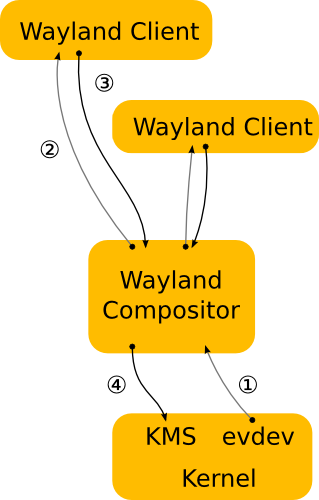
By having the Wayland compositor communicate directly with clients, unnecessary buffer copies are reduced. Also, because it communicates directly with KMS / the kernel, performance improves. Wayland also supports newer protocols such as fractional scaling.
Terminology
This section explains several terms used in Wayland.
DRM / KMS
These are kernel-side mechanisms used on Linux to handle GPUs and display output. DRM stands for Direct Rendering Manager. It is a mechanism for safely handling GPUs from the kernel. KMS stands for Kernel Mode Setting. It handles display configuration.
Page Flip
A page flip is the act of switching the image currently being displayed to another image. By replacing the framebuffer that contains the contents of one screen frame, the system avoids drawing directly to the screen while rendering is still in progress. Instead, once the entire frame has finished rendering, the display is switched to reference the new frame.
1. The app or compositor creates the next image
2. That image is placed into a framebuffer
3. DRM/KMS is asked to display it next
4. The display switches to the new image
This prevents an incompletely rendered window from being shown on the screen.
Direct Scanout
Direct Scanout is an optimization where the Wayland compositor outputs an app’s buffer directly to the display without compositing it. For example, if a window covers all other elements—in other words, if it is fullscreen—the compositor can place it directly on a KMS plane and skip other processing. This reduces GPU load and latency.